
Office Resources
Check Availability
Always know our availability by checking our availability calendar.
- Ensure we have availability on said day (+10 hours available) – subject to change as we grow.
Reports>Availability Calendar(make sure to select Ongoing) - 72HOUR coupon off TTBs or MIMO’s may be used for next 3 business days with availability 20+ hrs. (3 business days can be extended to up to 2 weeks out IF the customer is setting up weeky or biweekly service with a TTB initial)
- Always ensure below requirements are met before asking scheduling to assign and approve a job:
– quote was accepted
– guidelines signed
– cc is on file.
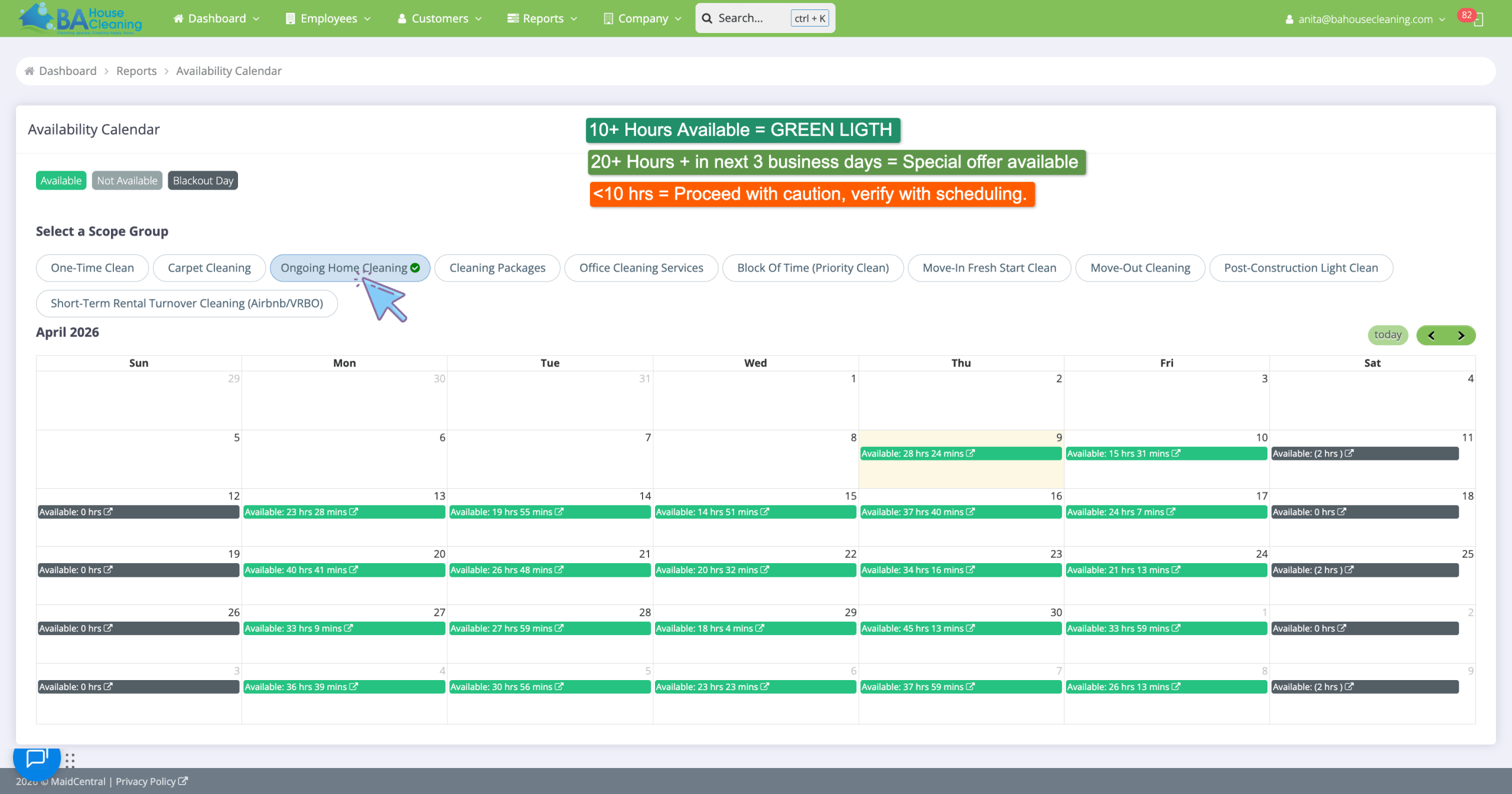
If less than 10 hrs available on a specific day, offer a different day to the client. If client insists the original day and is not flexible, contact scheduling for their approval before placing the job in not scheduled.
Sending Confirmations
Once Scheduling has assigned CT(s) and notified you the job is confirmed, you may send a confirmation.
If a cleaning is scheduled for more than 1 week out, use the “CONF template DAY only” templates, as those will confirm the day/date only and not the time. (More than one week out is a lot of time in between and likelihood of that time changing is very high, so we do not offer the time of arrival yet.)