Be Kind - - Be a Team Player - - Own It
Slack Basics for Field Staff
WHY WE USE SLACK
Slack is how the field team and the office stay connected during the day. You only need to know three places: #general, your #ct channel, and Direct Messages. Each one has a different job.
QUICK REFERENCE: WHERE DOES MY MESSAGE GO?
| What You Need | Where to Message |
|---|---|
| Company news or reminders from the office | #general (read only) |
| Running late or locked out | Your #ct channel |
| Question about a job or your schedule | Your #ct channel |
| Pay, time off, or HR question | Your #ct channel |
| Need supplies or equipment | Your #ct channel |
| Something wrong at a client’s home | Your #ct channel |
| Highly confidential matter only | Direct Message |
#GENERAL: COMPANY ANNOUNCEMENTS

#general is where the office posts announcements for the whole company. A post here notifies everyone at BAHC.
– Read it: company news, reminders, and celebrations are posted here.
– Check it every day, and turn on notifications so you don’t miss anything.
– Don’t use it to ask about your jobs, your schedule, or a client. Those questions go in your #ct channel.
YOUR #CT CHANNEL: YOUR MAIN LINE TO THE OFFICE

Your #ct channel is your main channel, and it is the fastest way to get help. It is named after you (for example, #ct-maria). Only you and the office staff are in it.
Use your #ct channel for:
– Questions about your schedule or jobs
– Running late, lockouts, or trouble getting into a home
– Supplies, equipment, or car issues
– Anything unusual at a client’s home (damage, pets, special requests)
– Photos the office needs to see
– Pay, time off, or HR questions
Why here and not a DM? Everyone in the office can see your channel. Whoever is free answers you first, so you get help faster.
DIRECT MESSAGES (DMs): ONLY FOR CONFIDENTIAL INFORMATION
Use a DM only for highly confidential information. Everything else, including pay, time off, and HR questions, goes in your #ct channel.
OK to send by DM:
– Highly confidential personal matters
– A serious concern about a coworker
NOT OK to send by DM:
– Asking for favors
– Trying to get around company policy or keep something hidden from the office
– Schedule questions, running late, or job issues
– Client, home access, or supply problems
– Pay, time off, or HR questions (use your #ct channel)
When in doubt or not sure if it’s highly confidential? Then it isn’t. Post it in your #ct channel.
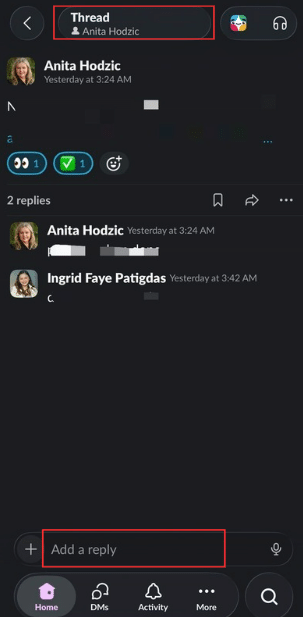
Use Threads in Slack
Use threads when replying to an existing conversation or topic. This keeps related messages together and makes conversations easier to follow.
If you are starting a different topic or question, send a new message in the channel instead of replying inside an unrelated thread.
Slack Notification Guidelines
When the office sends you a message, please acknowledge it so we know you have seen it.
- 👍 = I saw it / understood
- 👀 = I am checking it
- ✅ = Confirmed / completed
Even a quick reaction lets the office know that you received and read the message.

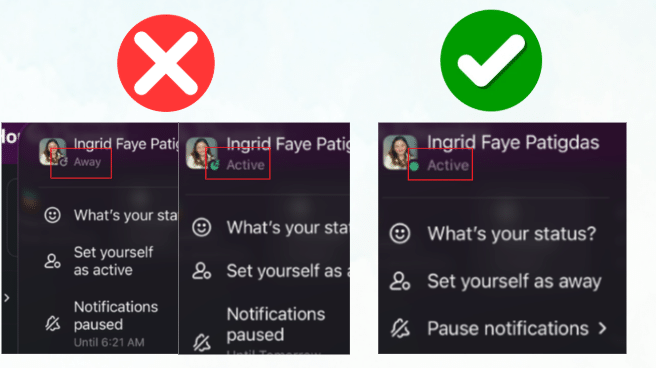
Keep Your Slack Notifications ON
Your Slack notifications should remain active during your workday.