Office Resources
Payroll processing for CT’s
- PTO & Sick
Follow the steps below:- Calculating PTO Pay
- Video:
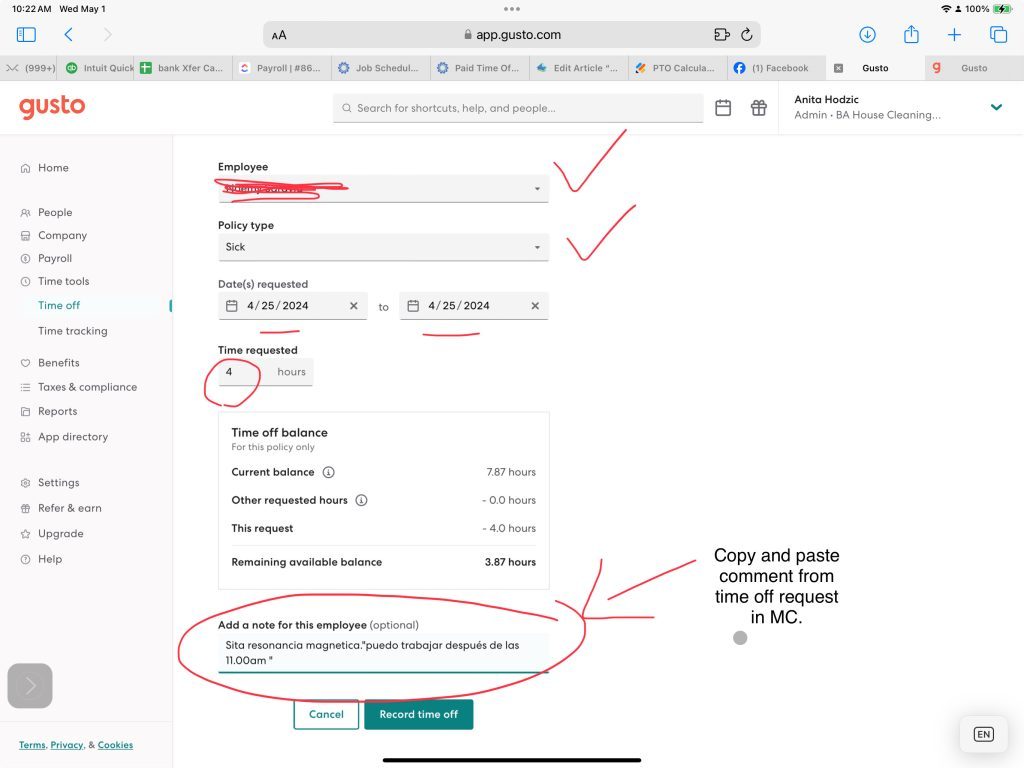
- Record PTO in Gusto
People>Employees>Locate employee and record # of hours and the time off type.
- Pull Payroll Summary report from Maid Central & ensure there are no issues
- Payments for pay period are all processed
- No timesheets should be missing
- Clear out any errors before moving to the next step
- Paste data into Payroll spreadsheet & add any additional pays necessary
- Payroll Spreadsheet: https://docs.google.com/spreadsheets/d/1MoZPRD1AZhbkxjDobI3pPP5ALxNSLota7Fl_N2l6BzA/edit?usp=sharing
- Payroll Spreadsheet: https://docs.google.com/spreadsheets/d/1MoZPRD1AZhbkxjDobI3pPP5ALxNSLota7Fl_N2l6BzA/edit?usp=sharing
- Entering/transferring payroll amounts into Gusto
- Verify that all amounts match 100% and Submit payroll
- Enter amounts into Weekly excel spreadsheet and report information to Anita privately
- Weekly google sheet: https://docs.google.com/spreadsheets/d/1_hgQh5VEIftpUncdmRngak2qaa6F5dIa4VJPpLlWyKY/edit?usp=sharing
- Slack Anita PRIVATELY with the following information
Payroll Withdrawal amount :
COGS%:
- Weekly google sheet: https://docs.google.com/spreadsheets/d/1_hgQh5VEIftpUncdmRngak2qaa6F5dIa4VJPpLlWyKY/edit?usp=sharing
- FINALIZE by CLOSING payroll (VERY IMPORTANT STEP!)
Note: Always include mileage reimbursement before adding phone reimbursement or other supplement pay as it will override mileage reimbursement for CTs.