
One Time Service Sales Script
🟡 Step 1: Qualify the Lead
“Is the home currently furnished or empty?”
🛋️ If Furnished:
Proceed with a One-Time Cleaning quote.
Ask:
“Has the home been professionally cleaned in the last 4 months?”
If no:
✅ “We do require our Top to Bottom Deluxe service in that case to ensure the best results — I’ll include that in your quote.”
📦 If Empty:
Politely switch to the Move-Out Cleaning Script.
“Got it! Since the home is empty, we’ll use our move-out process. Let me grab that info for you now.”
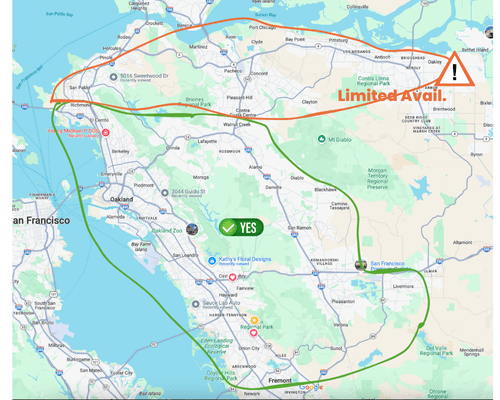
🗺️ Step 2: Check the Service Area
Ask:
“What city is the home located in?”
Verify using the Service Area Map below
- ✅ Green Zone: No restrictions
- ⚠️ Orange Zone: Limited availability — set expectations
📝 Step 3: Collect Contact Info
Before quoting, always collect:
- 👤 Name
- 🏠 Address
- 📞 Phone
➡️ No email = no quote
✅ As soon as you click “Save Lead” or “Send Quote” in MaidCentral, the lead is created in GHL Opportunities for follow-up.
🧹 Step 4A: Rate the Home’s Cleanliness (Dirt Code)
Ask:
“On a scale from 1 to 10, how would you rate your home’s current cleanliness?”
1 being immaculate and 10 being extremely challenging.
Examples:
- 1 – Immaculate: “Does someone even live here? Looks spotless.”
- 5 – Average: “Lived-in with light buildup.”
- 10 – Extremely Challenging: “Overwhelming — deep cleaning needed in most areas.”
✅ Let them know this is just for team prep — no judgment.
🧾 Step 4B: Build & Present the Quote
-
Quote One-Time or TTB (based on condition/history)
-
Review add-ons one by one — ask Yes/No
-
Confirm quantities where applicable
-
Say:
“The price for this cleaning will be $_____, and that includes [TTB if needed or any specific services]. Let me also send you a formal quote so you can review everything.”
Then say:
“I’ll email you a copy of the quote right now — one second while that goes out.”
📩 Send the quote via MaidCentral
✅ Share pricing verbally first, then send the quote.
⏱ Step 5: Offer Availability (Assume the Sale)
Immediately after sending the quote:
“I can get you on the schedule as soon as [Day, Date, Time]. Do you have any time preferences, or is anytime okay?”
✅ Keep the availability calendar open in a separate tab
“We’ll confirm the date now. The 1-hour time window will be sent the day before based on routing. We’ll note your preferences, but can’t guarantee exact time.”
📲 Step 6: Send Guidelines Immediately
“Before we can confirm anything, I’ll text you our customer guidelines. If you could take a moment to review them while we’re still on the phone, I’ll stay on to answer any questions.”
📩 Send guidelines via GHL text
✅ Do not pencil in unless guidelines are signed and a card is on file in MaidCentral.
✅ Step 7: Finalize Booking
Once both are received:
- Pencil into MaidCentral as “NOT Scheduled”
- Send DATE ONLY confirmation via MC SMS template
- Notify Scheduling in Slack:
6/25 – Jessica Nguyen One-Time (TTB) – ready to be confirmed. Prefers 9am–11am.