
MIMO Script
🟡 Initial Conversation – Qualify & Gather Info
When a customer says “just a one-time cleaning,” always ask:
“Is this a move-out cleaning, or will the home still be furnished?”
📝 Collect Contact Info Before Quoting
Before sharing any pricing, always collect:
-
Full Name
-
Phone Number
-
Email Address
Enter the lead into MaidCentral immediately.
✅ This starts automated follow-up if they don’t book right away.
🗺️ Service Area Check
Before continuing, ask:
“What city is the property located in?”
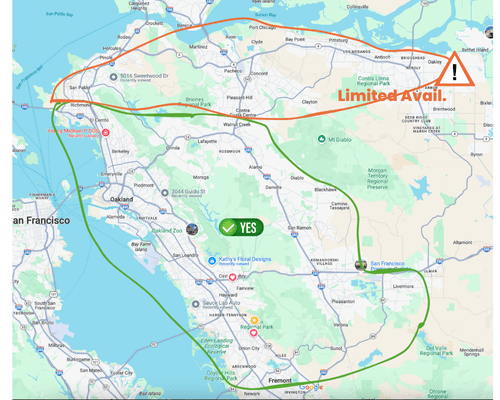
Then check this service area map:
-
✅ Green Area – Main service zone. No restrictions.
-
⚠️ Orange Area – Limited availability (fewer routes, longer lead times)
If the client is in the orange zone, explain:
“That area has limited availability — we’ll check our schedule and see what we can offer.”
🧭 Pre-Qualification – Is the Home Empty?
Ask:
“Will the home be empty at the time of cleaning?”
-
If Yes → continue with Move Out Cleaning
-
If No → offer Top to Bottom Deluxe + Add-ons
(Use the main Sales Script for furnished homes)
✅ If Qualified – Booking Process
-
Open the Availability Calendar in a new tab before proceeding.
You’ll need this to quote real dates/times. -
Follow the Move Out Cleaning Quote Steps in MaidCentral
-
Choose the correct service type
-
Fill out job details
-
Enter notes
-
-
Give pricing and always email the quote through MaidCentral:
“Thanks! Based on what you’ve shared, the cost for your move-out cleaning is $_____.”
📩 Sending the quote ensures we have a written record of pricing shared.
-
Offer next availability:
“Perfect. I can get you on schedule as soon as [Day, Date, Time]. Did you have any time preferences or is anytime okay?”
-
Clarify scheduling process:
“We’ll confirm the date now. The time window (usually a 1-hour range) will be sent the day before your cleaning, once we finalize routing. We’ll note your preferences, but exact timing depends on scheduling.”
-
Begin the booking process:
“To hold your spot, I’ll need a signed copy of our customer guidelines and a card on file. I’m texting you the guidelines link now — if you can review it while we’re on the phone, I’ll stay on in case you have questions.”
-
Once guidelines are signed:
-
Fill out the job questionnaire
-
Add the card on file in MaidCentral
-
-
Once both are completed:
-
Pencil the job in as “NOT Scheduled”
-
Send the confirmation (DATE ONLY) using the MaidCentral SMS template
(Do not include the time — it’s confirmed by Scheduling the day prior)
-
-
Notify Scheduling in Slack:
7/18 – Maria Gonzalez Move Out Cleaning – ready to be confirmed. Prefers 10am–12pm if possible
-
Wrap-up with service reminders:
“Just a heads up: the home must have electricity and running water. We don’t remove trash or clean inside cabinets unless they’re empty — just want to make sure everything goes smoothly!”