
Office Resources
How to Set-up Inspections (QA)
Daily Management
-
- Check daily to ensure all house checks have been done as needed and scheduled.
- Ensure all boxes on the checklist are fully filled out.
- Ensure House Checker Fills Out the QA Form
When to Set Up Quality Checks
Routine Schedule
-
- At least one per quarter per technician.
- Once a month for the first three months of employment.
- Once daily for the first week of being solo.
- As needed for underperformers.
- As needed when Team Lead is unavailable on a big job.
Monthly Review
-
- At the beginning of every month, review scorecards and complaints records.
- Identify technicians who receive two or more complaints in last 90 days or have a scorecard below 95%.
- Use Team Leads or Trainers to perform inspections.
How to Set Up Quality Checks
1. In MaidCentral, go to Company>Satellite offices

2. Located the oldest date, Click “Edit”

3. Open new tab for MC, Click “Job Schedule”

4. Locate the job that will need QA performed at.

5. Double-click on the job.

6. Copy address

7. Switch to Satellite Office tab
8. Click this text field.

9. Click Office Name text field.

10. Change the date to the date of when QA will take place Example: “12/3”
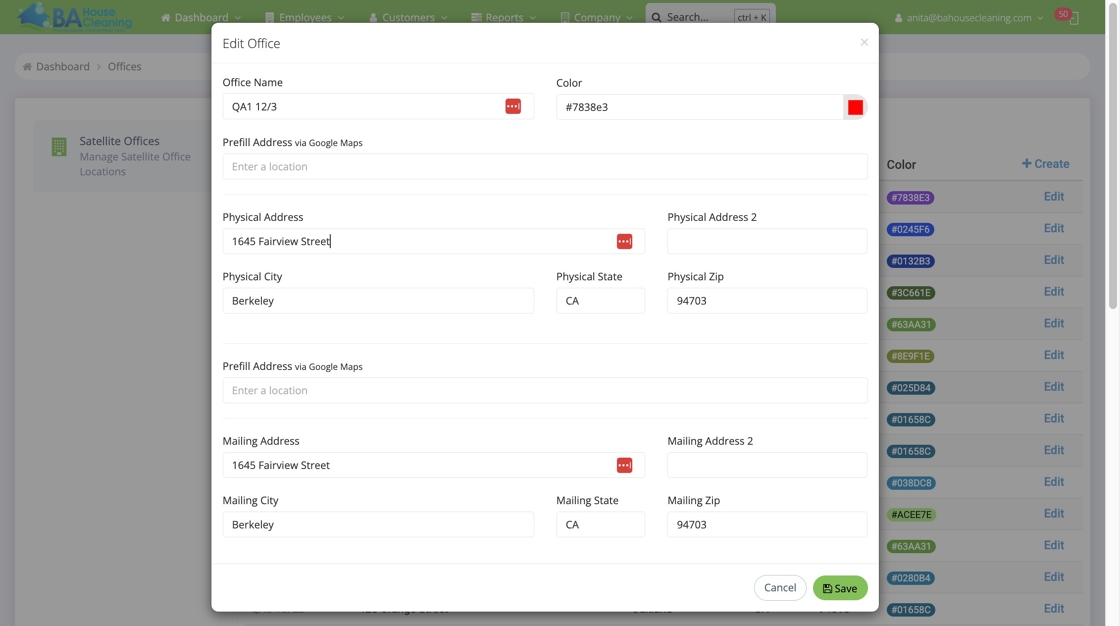
11. Add the name of the client of the QA

12. Double-click this text field.

13. Click the “Enter a location” field.

14. Paste address of the QA home