
Handling Last-Minute Reschedules
🎯 Goal
Keep the scheduled cleaning whenever possible to avoid gaps and protect staff efficiency.
Only when a client insists on rescheduling and threatens to cancel over the late-reschedule fee do we consider a one-time courtesy waiver.
1️⃣ First Priority – Keep Today’s Appointment
-
Acknowledge the request and explain the impact:
“Our team is already scheduled for today, so a last-minute change creates a gap that impacts our technicians. Is there any way we can still keep today’s cleaning?”
-
Offer solutions:
-
Allow a neighbor, friend, or family member to provide access.
-
If the home isn’t ready, offer our Tidy-Up Service so technicians can still clean.
-
Goal: for the client to understand the burden and agree to keep the appointment.
2️⃣ If They Still Insist on Rescheduling
-
Calmly explain the policy:
“Because this change is inside the 48-hour window, our policy is to charge a $100 late-reschedule fee.”
-
Most clients will either:
-
Work with us to keep the appointment, or
-
Accept the $100 fee and proceed with rescheduling.
1. If so, text them a link to the reschedule form.
2. Put a job in “Not Scheduled” while we wait for the form to come through, with notes on the job.
Video on how to put job in not scheduled:
-
3️⃣ Only If They Threaten to Cancel Service
-
Escalation point:
If the client threatens to cancel service because of the $100 fee and they have never used a courtesy waiver, you may offer a one-time free pass only if they submit the reschedule form while you are on the phone. -
Required script:
“I understand your concern. As a one-time courtesy, I can waive the $100 late-reschedule fee if you can fill out our reschedule form right now while we’re on the call. I’ll text you the link. This is a one-time pass and cannot be used again.”
-
Important conditions:
-
The reschedule form must be completed during the call.
-
Make it clear the waiver cannot ever be granted again.
-
4️⃣ Apply the Courtesy Pass
-
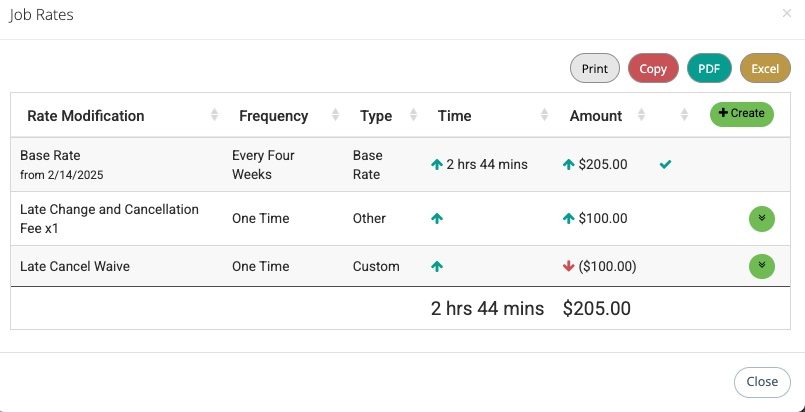
In MaidCentral → Modify Rates, add Late Cancel/Reschedule Fee – PASS ($100) to record the waiver.
- Click +Create –> Select Extra –> Add Late Cancel Fee (+$100)
- Modify Rates –> Add Custom Entry –> Late Cancel Waive (-$100)
- Make sure Minutes is 0 & uncheck “Included in technician Payout”
-
Screenshot
- Tag the client account:
LateFeeWaiverUsed. - Add an internal note: “One-time courtesy late-reschedule fee waived – [Your Name] – [Date].”
5️⃣ Send Confirmation Email
-
Use the MaidCentral email template: “Late Cancellation Fee Waived Email #1.”
-
This email:
-
Confirms the late-reschedule fee was waived one time.
-
States that future late reschedules will automatically incur the $100 fee.
-
6️⃣ If No Courtesy Pass Is Granted
-
If the client reschedules but does not qualify for a free pass:
-
In
-